Cash Collect
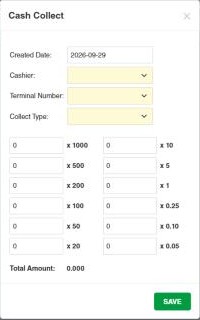
Cash Collect records the cash counted in a POS drawer, by denomination. Use it for the starting cash, cash picked up during the day, and the final count. CIRMS compares the count with the POS sales to show whether the cashier is short or over.
Menu: POS › Cash Collect
How to record a cash count
-
Open POS › Cash Collect and click ⊕ (Add New Collection).
-
Fill in:
Field What to enter Created Date The date of the count. Cashier The cashier whose drawer you counted. Terminal Number The POS terminal. Collect Type Beginning (starting cash), Picked Up (cash taken out during the shift) or Ending (final count). -
For each bill and coin, enter how many pieces you counted. The Total Amount is calculated.
-
Click Save.
Checking a cashier's collection
Search the list by Terminal Number and Date Collected. Select a row to see the summary on the right, including Actual Sales, Cash Beginning, Picked Up Cash, Total Collection and Cash Short/Over.
How the summary is worked out
- Total Cash Receive = Picked Up Cash + the ending count − Cash Beginning: the cash the cashier actually took in.
- Total Collection: the cash the POS recorded as received from sales in the same period and terminal.
- Cash Short/Over = Total Cash Receive − Total Collection: below zero the cashier is short, above zero over.
- Actual Sales is the terminal's total sales; each other payment method (cards, e-wallets…) is listed with its amount.
Example. Cashier Liza, terminal 2: beginning cash 2,000.00; the supervisor picked up 10,000.00 at 2 pm; the ending count is 7,450.00. Total Cash Receive = 10,000 + 7,450 − 2,000 = 15,450.00. The POS recorded 15,500.00 of cash sales, so Cash Short/Over is −50.00: Liza is 50.00 short.
Other permissions for this module
| Permission | Allows you to |
|---|---|
| POS › Cash Collect › Update | Change cash counts |
| POS › Cash Collect › Delete | Delete cash counts |