Other Income
Use Other Income for money received that isn't from sales of products, for example referral fees, commissions or rental income.
Menu: Sales and Other Income › Other Income
How to record other income
-
Open Sales and Other Income › Other Income and click ⊕. The detail window opens.
-
Fill in:
Field What to enter Payee Type Who is paying: Others, Supplier, Customer or Employee. Received From For Others, type the payer's name. For the other payee types, pick the supplier, customer or employee. Payment Method How the money was received. For a check or bank deposit, also choose the Bank Account; for a check, enter the Check No. and Check Date too. Created For The branch the income belongs to. Transaction Date The date received. Remarks Optional notes. If the payment method has a fee, it's shown as the Surcharge.
-
In the table, choose the Type of income, enter the Amount and optional Remarks, then click ✔ to add the row.
-
Click Save ▾ and choose Save, Approve or Approve and Print.
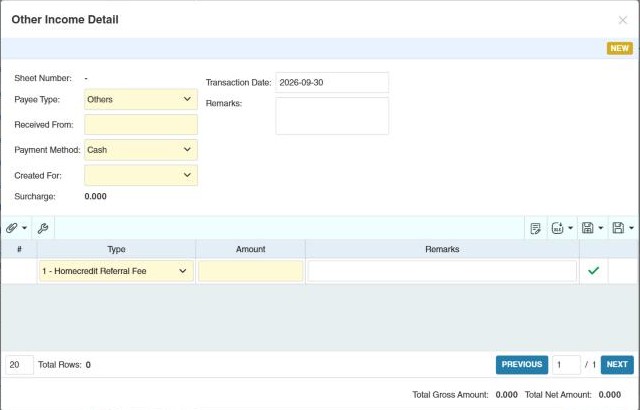
The income types come from Data › Other Income Type.
Example
The store rents a corner to a phone accessories kiosk for 8,000.00 a month. Each month, record an other income: Payee Type Others (or a customer, if the tenant is set up as one), Type Rental Income, Amount 8,000.00, paid in cash. Approve. The cash shows in the day's cash report, and 8,000.00 appears under Other Income in the Income Statement.
Settings that affect this module
Your administrator can change these in Settings (see About settings). Click a section to see the choices.
Generic Settings › Other Income
Other permissions for this module
| Permission | Allows you to |
|---|---|
| Sales and Other Income › Other Income › Approve | Approve other income |
| Sales and Other Income › Other Income › Revert | Revert it back to draft |
| Sales and Other Income › Other Income › Import Excel | Import income rows from Excel |
| Sales and Other Income › Other Income › View Other Users' Transaction | See entries created by other users |