Other Expense
Use Other Expense for money paid out that isn't for purchased goods, for example utilities, rent or repairs.
Menu: Purchase and Other Expense › Other Expense
How to record an expense
-
Open Purchase and Other Expense › Other Expense and click ⊕. The Other Expense Detail window opens.
-
Fill in:
Field What to enter Payee Type Who is being paid: Others, Supplier, Customer or Employee. Pay To For Others, type the payee's name. For the other payee types, pick the supplier, customer or employee. Payment Method How you paid. For a check or bank deposit, also choose the Bank Account; for a check, enter the Check No. and Check Date too. Created For The branch the expense belongs to. Transaction Date The date of the expense. Remarks Optional notes. -
In the table, choose the Type of expense, enter the Amount and optional Remarks, then click ✔ to add the row. Add more rows if the payment covers several expense types.
-
Click Save ▾ and choose Save, Approve or Approve and Print.
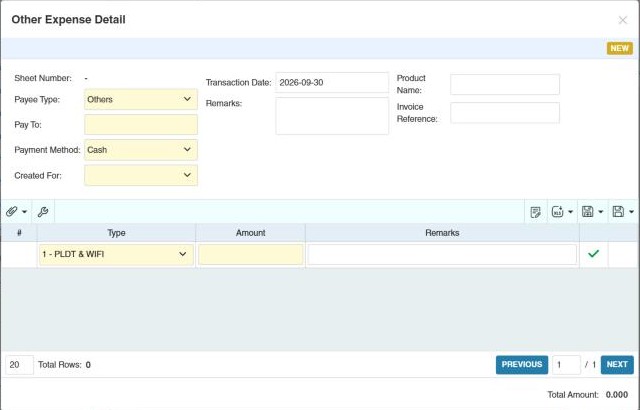
The expense types in the list come from Data › Other Expense Type.
How to find expenses
In the Other Expense list, filter by Pay To, Trans. Date, Payment Method or Other Expense type, then click Search. The bottom of the list shows the total by payment method.
Changing many expenses at once
- Bulk Update (list toolbar): tick draft expenses and change their Payee Type, Payment Method, Bank Account, Check No. / Check Date, Charge Type / Charge Based On or Remarks together. This applies to "Draft" status only
- Import: add many expenses from Excel (download the Excel Template first; check View Logs).
What approval does
The amount is recorded as paid: cash expenses appear in the Cash Transaction report and the Daily Collections and Expenses Report, checks in Issued Check, charges in Charge Expense, and each Type in the Other Expenses of the Income Statement (unless the type is excluded). Stock doesn't change.
Example
The store pays the June electricity bill of 18,450.00 by check: Payee Type Others, Pay To Meralco, Payment Method Check, Bank Account BDO, Check No. 004513. One row: Type Electricity, Amount 18,450.00, Remarks June 2025. Approve. The check waits in Issued Check until it clears, and 18,450.00 shows under Electricity in June's income statement.
Settings that affect this module
Your administrator can change these in Settings (see About settings). Click a section to see the choices.
Generic Settings › Other Expense
Other permissions for this module
| Permission | Allows you to |
|---|---|
| Purchase and Other Expense › Other Expense › Approve | Approve expenses |
| Purchase and Other Expense › Other Expense › Revert | Revert expenses back to draft |
| Purchase and Other Expense › Other Expense › Import Excel | Import expense rows from Excel |
| Purchase and Other Expense › Other Expense › View Other Users' Transaction | See expenses created by other users |