Product Conversion
Product conversion is for manual group and ungroup products: products made up of other products (components), set up on the product's Product Grouping tab.
- For a group product, the quantity you enter is added to the product and taken from its components (for example, packing 6 bottles into a gift set).
- For an ungroup product, the quantity is taken from the product and added to its components (for example, opening a case into single bottles).
The stock changes when the conversion is approved.
Menu: Others › Product Conversion
How to convert a product
Required permission
Others › Product Conversion › Create
- Open Others › Product Conversion and click ⊕ (Add New Product Conversion).
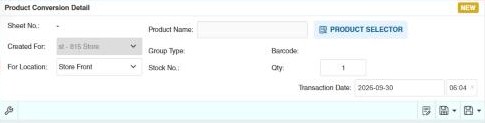
- Choose Created For and For Location.
- Click Product Selector and pick the product. Only manual group and ungroup products are listed. Its Group Type, Barcode and Stock No. are shown.
- Enter the Qty to convert. The components are listed with their Required Qty and Allocated Qty.
- Click Save ▾ and choose Save or Approve.
Example
See the manual group and manual ungroup examples in Product grouping types: assembling 10 holiday baskets from wine, chocolates and baskets, or opening 2 cases of softdrinks into 24 bottles.
Other permissions for this module
| Permission | Allows you to |
|---|---|
| Others › Product Conversion › Approve | Approve conversions, which changes the stock |
| Others › Product Conversion › Revert | Revert conversions |