Branch
A branch is a store, warehouse or office. Each branch has one or more locations where stock is kept, for example Store Front and Warehouse. Stock, prices and permissions are all kept per branch.
Menu: Data › Branch
How to add a branch
-
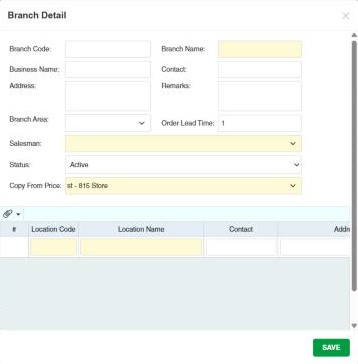
Open Data › Branch and click ⊕ (Add New Branch).
-
Fill in:
Field What to enter Branch Code / Branch Name A short code and the branch name. The name is required. Business Name The registered business name, if different. Contact / Address Contact details. Branch Area The Branch Area it belongs to. Order Lead Time Days it usually takes to receive an order at this branch. Salesman The branch's default salesman (required). Status Active or Inactive. Copy From Price Where the new branch's product prices come from (required). Choosing a branch copies that branch's prices for every product and makes the new branch keep following it (its Copy From on the product's Price tab is set to that branch). Choosing none copies the prices of the first branch created (normally the main branch) once and lets the new branch have its own prices from then on. Remarks Optional notes. -
In the table at the bottom, add the branch's locations: Location Code and Location Name (both required) and contact details, then click ✔ at the end of the row to add it.
-
Click Save.
After adding a branch, give users access to it in User › User Permissions. Users only see the branches they have permissions for.
Example. You open a second store that will sell at the same prices as the main store: Branch Code 002, Branch Name Store 2 – Market, Copy From Price 001 – Main Store, and two locations, Store Front and Stockroom. Every product now has prices in Store 2 that follow the main store. Later, to give Store 2 its own price for one product, clear that row's Copy From on the product's Price tab.
Locations
A location is a place inside the branch where stock is counted separately, for example Store Front, Stockroom or Warehouse. Every stock transaction says which For Location it affects, each product can have its own minimum and maximum per location, and stock reports can be run per location. A branch needs at least one location; add more only if you really keep separate stock.
Deleting a branch
When a branch is deleted, its locations are deleted too, and branches that copied their prices from it stop copying (their Copy From is cleared).
Other permissions for this module
| Permission | Allows you to |
|---|---|
| Data › Branch › Update | Change branch details |
| Data › Branch › Delete | Delete branches |